From git push to EC2: a CI/CD pipeline on AWS
How I ship KairoDash: Terraform sets up AWS, GitHub Actions tests and deploys, ECR stores the image, and OIDC plus SSM replace long-lived keys and SSH.
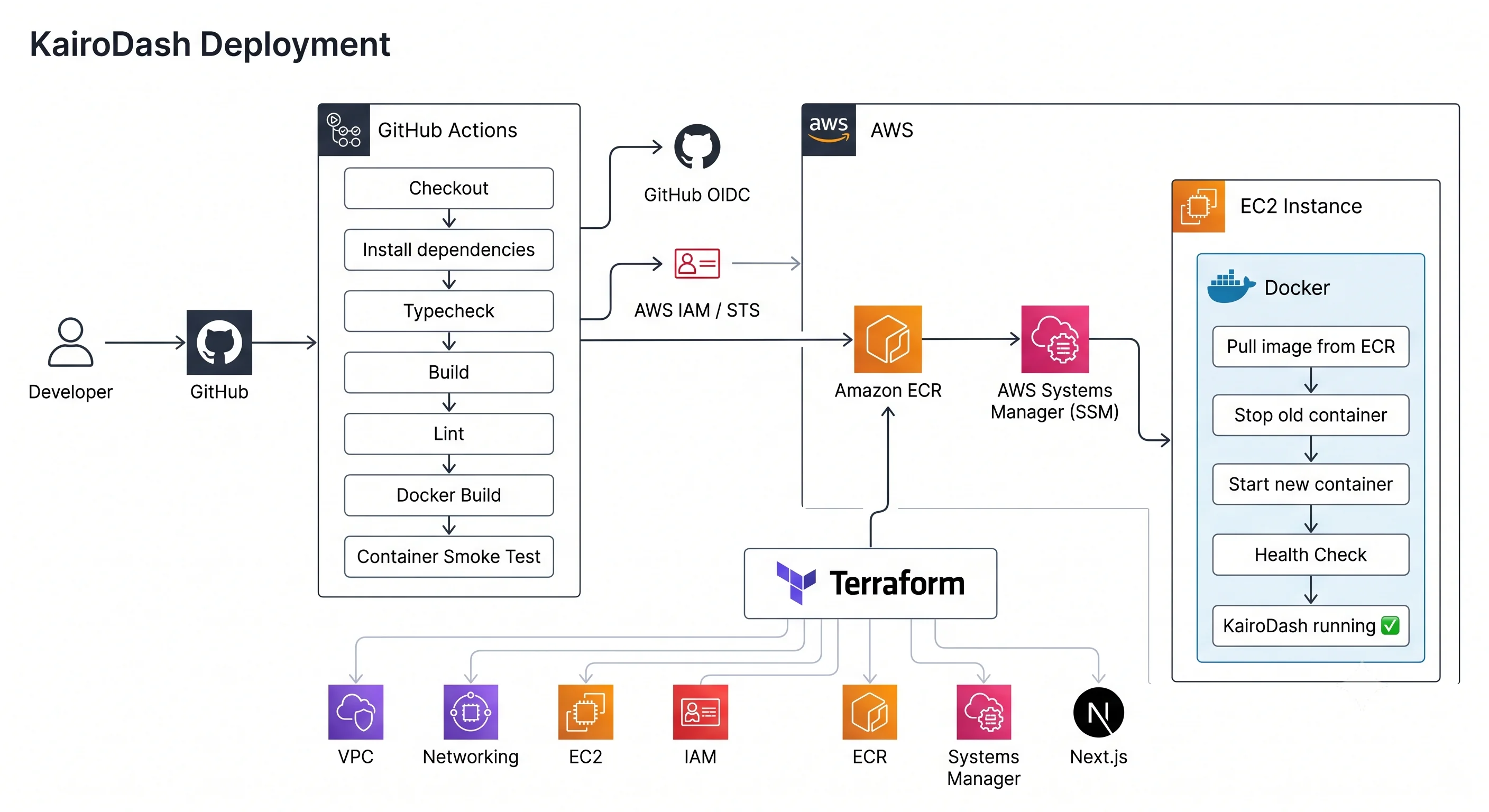
KairoDash uses a pull path: GitHub Actions builds a container and tests it, Amazon ECR stores that image, and an ARM64 EC2 host pulls it and runs it. Terraform creates the AWS setup, Systems Manager runs the deploy, and GitHub OIDC is how GitHub logs in to AWS.
The rule is simple. A push on the deploy branch should put a good image on the host, and if the image is bad the job should fail first, with no long-lived AWS keys in GitHub and no SSH key in the workflow.
Architecture
The system has three parts, and each one has a clear job.
Platform. Terraform creates the VPC, IAM, ECR, OIDC, and the EC2 instance. Ansible only sets up software on the host after the host exists. AWS resources go in Terraform, and software on the machine goes in Ansible or in the container.
GitHub Actions. This is the only place that creates a new app version. It checks the app, builds linux/arm64, tests the image, pushes it to ECR, then asks SSM to update the host. It does not build on the server.
The host. EC2 runs Docker. The instance can pull from ECR and talk to SSM, but it cannot push a new tag. The host only runs images, and it does not build them.
That split is the architecture, and the pipeline is how one image moves through it.
The thing we ship is the Docker image, tagged with the git SHA of the commit that made it. CI writes it, ECR is the list of images that may run, and EC2 does not get a zip file, a git pull, or a build folder. If I need to go back, the old SHA is still in ECR. The path is simple: commit, image, tag, registry, then the host, and the server never rebuilds it.
Failures stop at the right step. App checks fail in GitHub before Docker, a bad image fails the health test before ECR, login fails before SSM, and a broken container fails the deploy job after the pull. Each step has one reason to stop, which is easier than one big "deploy" button.
Why pull-based
In a push deploy, GitHub writes to the host, which can mean git pull, a zip file, or docker save over SSH. The server becomes a place to copy files, port 22 has to stay open for that, and then "what is running" is whatever the last job copied there.
Pull does the opposite. CI writes a tested image to a registry, the host logs in as itself and downloads a named tag, and GitHub does not copy files onto the machine. The workflow can still send an SSM command to start the update, but that command is a signal, not the image. To go back, the host pulls an old SHA that is already in ECR. If someone takes over the workflow they can push a tag, but they cannot run commands on the box.
Why Amazon ECR
The app runs in an AWS account, so the image store should live in that same account and use the same IAM that OIDC and the instance already use.
Docker Hub would need a password on the host, and GitHub Container Registry would need a GitHub token in AWS, so login for pull and login for deploy would be two systems. A zip file in S3 is a homemade registry with no layer cache, and you would not deploy by image digest.
ECR pull uses IAM, images stay private, and they live in the same AWS account as the VPC and the instance. The GitHub role can PutImage. The instance role cannot.
Why SHA tags, not latest
latest keeps changing, so two deploys can both use it, and rollback then means "whatever latest was before," which the registry no longer points to.
The commit is the change, so I tag the image with that SHA and the registry entry is that commit. The host runs kairodash:<sha>, which CI already started and tested. Rollback is docker pull of an old SHA still in ECR, not a rebuild on the server and not a guess at latest.
Platform
I did not click this together in the AWS console. I need to be able to rebuild it even after a bad apply, so the EC2 host is a Terraform resource like the VPC and the registry, not a one-off box I would have to recreate by hand.
The AWS setup is small on purpose:
- Custom VPC, public subnet, internet gateway, route table
- Security group:
3000for the app, SSH locked down t4g.micro(Graviton / ARM64)- ECR repository
- IAM roles for GitHub Actions and for the instance
- GitHub as an OIDC identity provider
- SSM on the instance
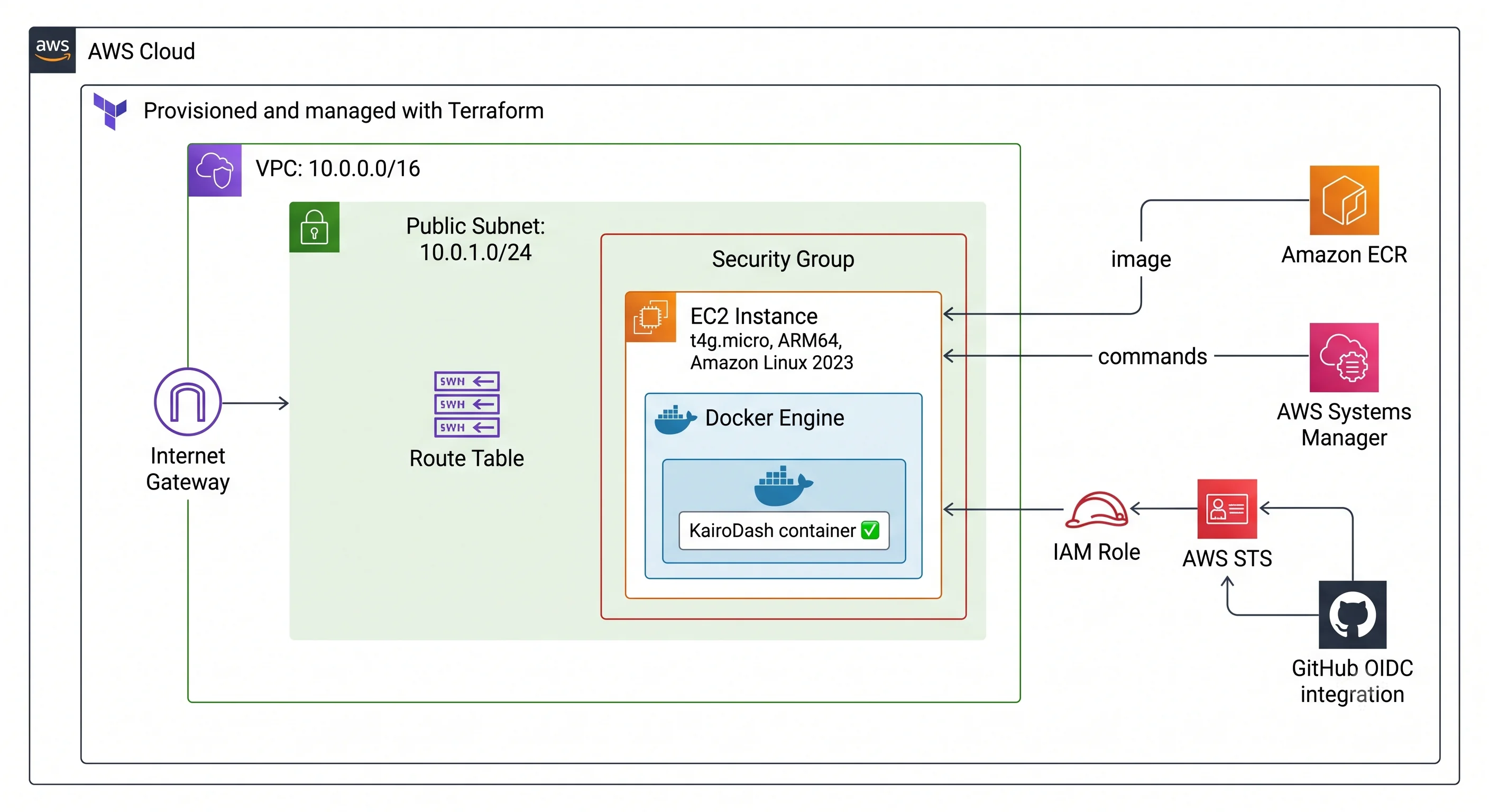
A public subnet and one host is a choice, not a design for a multi-AZ service. For this app it is enough: one container, one health URL, and one place to think about the network. Traffic goes to the internet gateway, then the subnet, then the instance, then the app on port 3000.
ARM64 is a rule because the instance is Graviton and GitHub runners are x86. The image must be linux/arm64, or the host will pull something it cannot run. QEMU on the runner lets that x86 machine build and start an arm64 image, so the smoke test runs the same architecture the host will pull. The image architecture has to match the host, even when the builder does not.
resource "aws_instance" "kairo" {
  ami           = data.aws_ami.amazon_linux.id
  instance_type = "t4g.micro"

  subnet_id                   = aws_subnet.kairo_public.id
  vpc_security_group_ids     = [aws_security_group.kairo_ec2.id]
  associate_public_ip_address = true

  iam_instance_profile = aws_iam_instance_profile.kairo_ec2.name
}
I save a plan first, review it, then apply that same plan instead of applying a new one at the last second.
terraform plan -out=tfplan
terraform apply tfplan
IAM has two roles because the jobs are different. The GitHub Actions role logs in to ECR and pushes, and the instance role pulls that image and uses SSM. CI does not need ssm:SendCommand on every machine, and the host does not need ecr:PutImage. The GitHub role can only push to this registry, and only from this repo:
statement {
  sid    = "ECRPushKairoDash"
  effect = "Allow"

  actions = [
    "ecr:BatchCheckLayerAvailability",
    "ecr:CompleteLayerUpload",
    "ecr:InitiateLayerUpload",
    "ecr:PutImage",
    "ecr:UploadLayerPart"
  ]

  resources = [
    aws_ecr_repository.kairo.arn
  ]
}
That is how permission works: GitHub Actions writes images and EC2 reads them, so if one role is stolen the damage stays on that side of the registry.
State is a local file today, which is fine for one person and one environment. It is not fine if two applies can run at once, or if that file is the only map of production. Terraform state maps names in the config to real AWS IDs and can also hold secrets, so remote state with locking comes before a second environment.
Pipeline
A push does not start with Docker. The app has to build first.
The workflow checks out the repo, installs with Bun, typechecks, builds, then lints. Those steps are fast compared with a registry push, and they catch errors that should never become an image.
Only then does the runner build the container, and it does not publish yet. The runner is x86, so QEMU emulates ARM and Buildx builds linux/arm64. push: false and load: true keep that image on the runner so the next step can start the same architecture the host will run.
- name: Set up QEMU
  uses: docker/setup-qemu-action@v3

- name: Set up Docker Buildx
  uses: docker/setup-buildx-action@v3

- name: Build Docker image
  uses: docker/build-push-action@v7
  with:
    context: .
    file: ./Dockerfile
    platforms: linux/arm64
    push: false
    load: true
    tags: kairodash:ci
A green build means the image files were created, not that the app is listening. The runner starts the image locally and hits the same health URL the host will use later.
docker run -d \
  --name kairodash-ci \
  -p 3000:3000 \
  kairodash:ci
curl --fail --silent http://localhost:3000/api/health
If that fails, the job prints logs and stops, so ECR never sees that tag. This check matters because deploy here is pull and replace: stop the old container and start the new one. If the new image is dead, CI should fail while the old version is still running.
Images that pass are not tagged latest, because latest keeps changing. The tag is the git SHA, so the registry name is a commit.
env:
  ECR_REPOSITORY: kairodash
  IMAGE_TAG: ${{ github.sha }}
docker tag \
  kairodash:ci \
  $ECR_REGISTRY/$ECR_REPOSITORY:$IMAGE_TAG

docker push \
  $ECR_REGISTRY/$ECR_REPOSITORY:$IMAGE_TAG
The deploy command uses that tag, the host runs what CI already started, and rollback is another pull of a SHA that is still in ECR, not a guess at old latest.
Identity
GitHub does not store AWS_ACCESS_KEY_ID. The job asks for an OIDC token, AWS STS checks it against the GitHub identity provider on the account, and the workflow assumes a role for the job.
permissions:
  contents: read
  id-token: write
id-token: write is not AWS access. It only lets the job ask for the token. The IAM trust policy is the real lock: this repository, and this branch if I add that. A workflow in another repo cannot assume the role just because it also runs on GitHub Actions.
Then the job trades that token for a short AWS session, limited to the account in GitHub variables:
- name: Configure AWS credentials
  uses: aws-actions/[email protected]
  with:
    role-to-assume: ${{ vars.AWS_ROLE_ARN }}
    aws-region: ${{ vars.AWS_REGION }}
    allowed-account-ids: ${{ vars.AWS_ACCOUNT_ID }}
The credentials last for the job, then they go away. Role ARN and region come from GitHub variables, not from a long-lived key in secrets.
GitHub proves who it is and IAM decides what it can do. ECR push is on the GitHub role and ECR pull is on the instance, the same split as the Terraform policy. AWS checks this when the role is assumed, and there is no long-lived key.
Deploy
Once the image is in ECR, the host must run that tag instead of rebuilding the same commit.
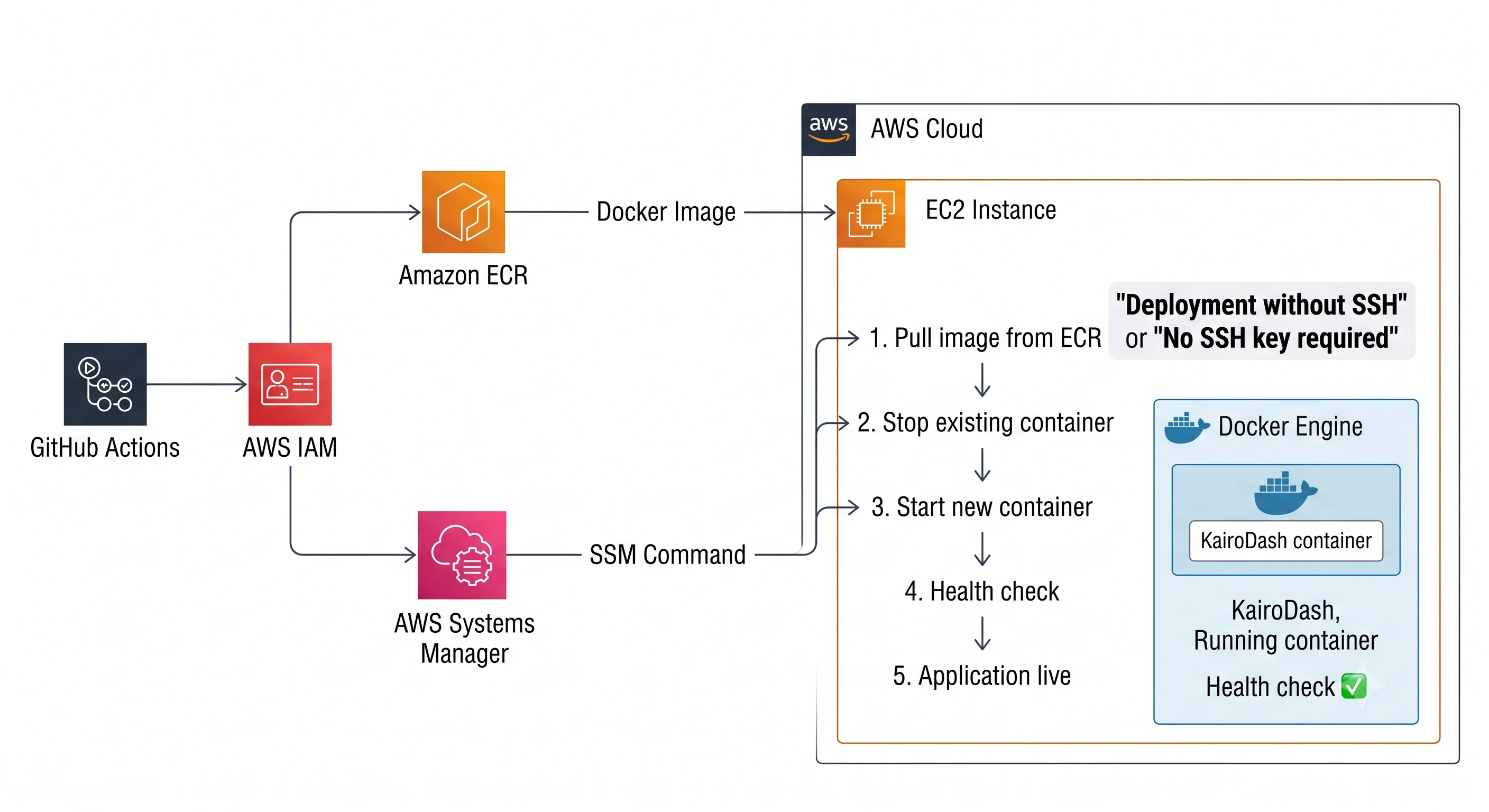
The workflow assumes the deploy role and sends an SSM command to the instance:
- Log in to ECR with the instance profile
- Pull
kairodash:<sha> - Stop the current container
- Start the new one
- Check
/api/healthon the host
I use SSM because the agent is already on the instance and the instance role already allows it, so GitHub never stores an SSH key. Port 22 can stay closed except for admin use. Deploy uses IAM and the agent, which is the same login model as the rest of the account.
The host does not get source code or install build tools. It pulls a tag that CI already started, so the server stays small and what is running is what was tested.
Destroy is not stop
I used terraform destroy to turn the instance off for the night, which was wrong. I wanted the server off, but I deleted the whole setup.
terraform plan -destroy -out=tfplan-destroy
terraform apply tfplan-destroy
Terraform removed the VPC, IAM, ECR, the OIDC provider, and the instance. The next Actions run failed on OIDC:
Could not assume role with OIDC:
The web identity token provided could not be validated.
The error is true, but it points at the wrong thing. The token path was fine; the identity provider and the role were gone, and the log named a missing piece of AWS.
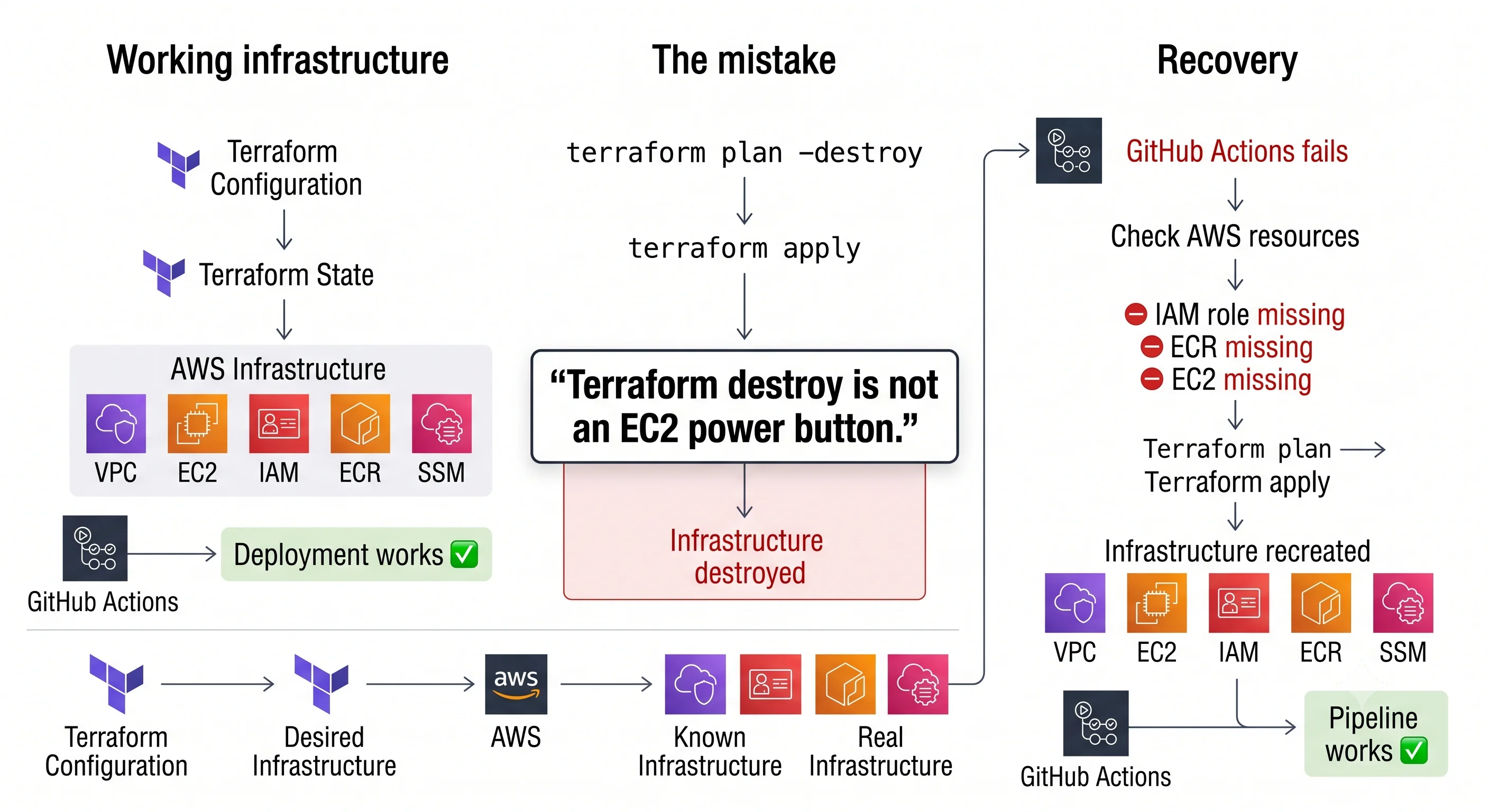
I did not rebuild in the console, because that would leave Terraform talking about AWS that no longer exists, or AWS holding things Terraform does not know. The config is what I trust, so I recovered the same way I create things: save a plan, then apply that plan.
terraform plan -out=tfplan
terraform apply tfplan
The instance came back with a new ID, which is expected. Restoring terraform.tfstate.backup would only change what Terraform thinks is there, but AWS was empty. An old state file does not create resources again; it makes config, state, and AWS disagree.
Those three have to match:
- Config is what I want
- State is what Terraform last saw
- AWS is what is there now
If the job fails, I check that chain before I debug the service named in the error: does it exist, then account, role, trust, permission, then can I reach it.
What I would change
This path is enough for one app and one environment. It is not a DEV and PROD setup yet.
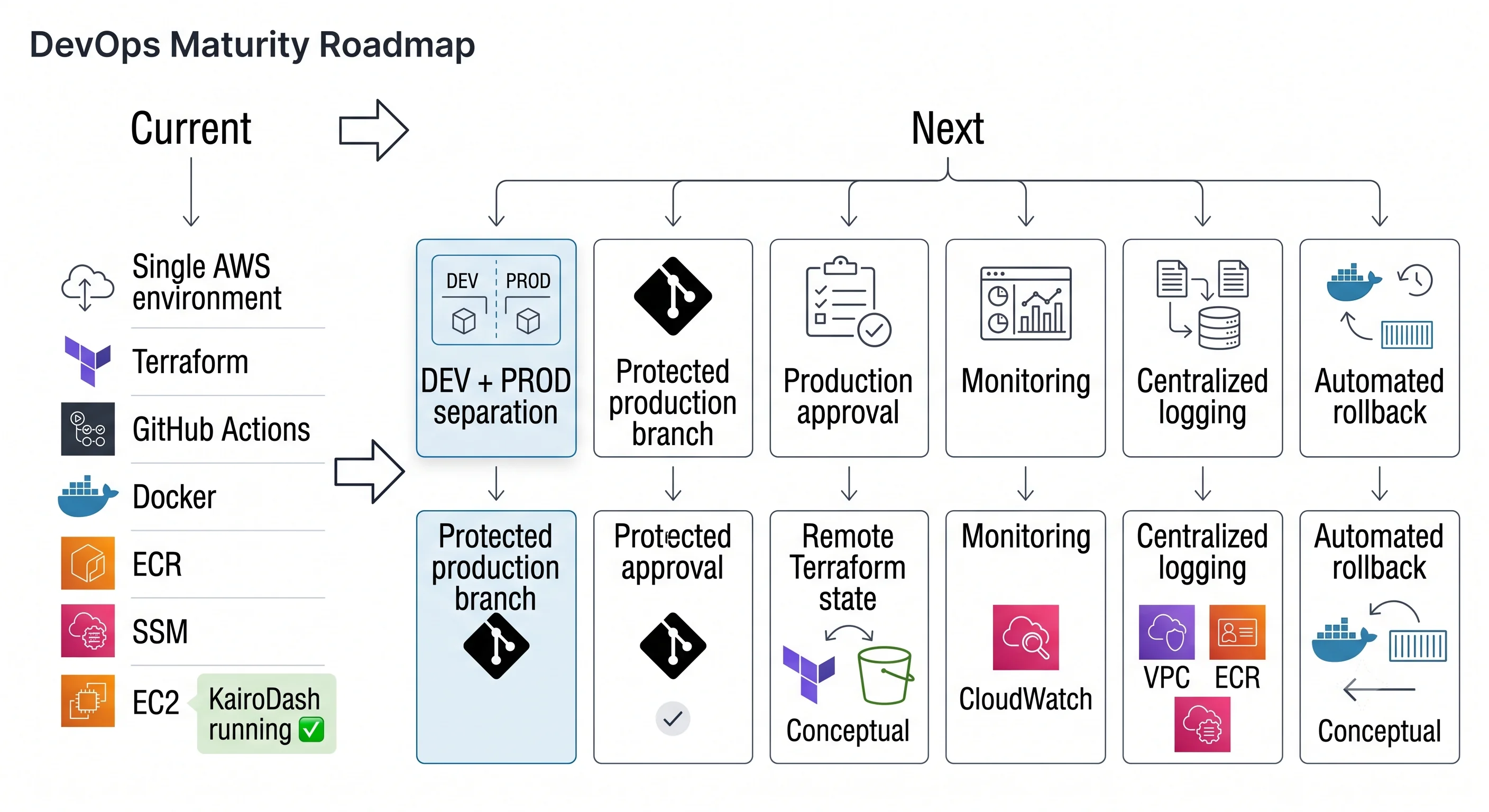
Next I want a real DEV and PROD, remote state with locking, and a protected apply to production. The shape stays the same: OIDC, SHA tags, health tests before push, and SSM pull on the host. What is missing is a split between environments and control of changes, not another tool in the middle.